Every renewal, seen coming.
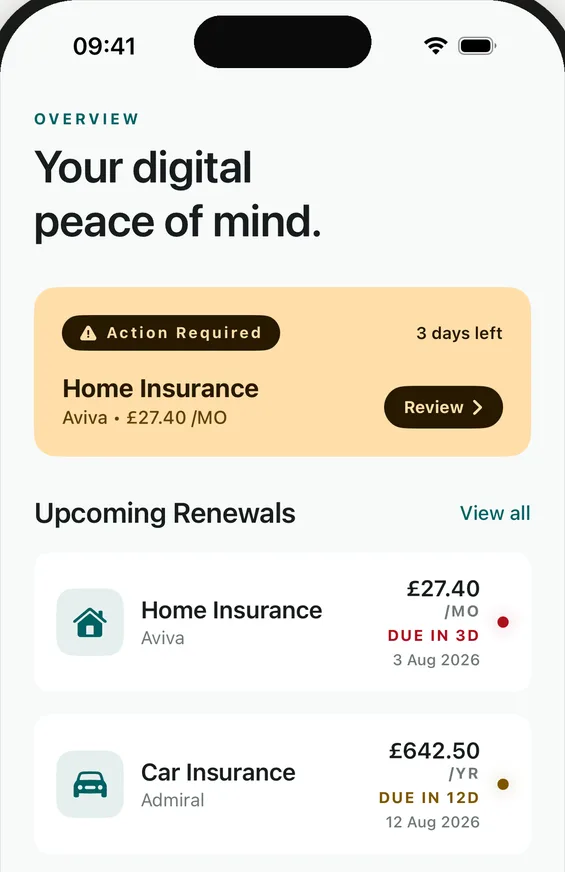
Overview opens on what the month costs and what the year adds up to, then the one renewal that needs a decision, with the days left on it. Everything else waits quietly underneath.
Keep contracts, policies and documents in one calm place. Anchrd tells you when it is time to act, so you can compare, cancel or renew with everything to hand.
No bank connection. No account in the app. Your data stays on your iPhone or iPad and in your own private iCloud.

Free to start on iPhone and iPad, iOS and iPadOS 26 or later.
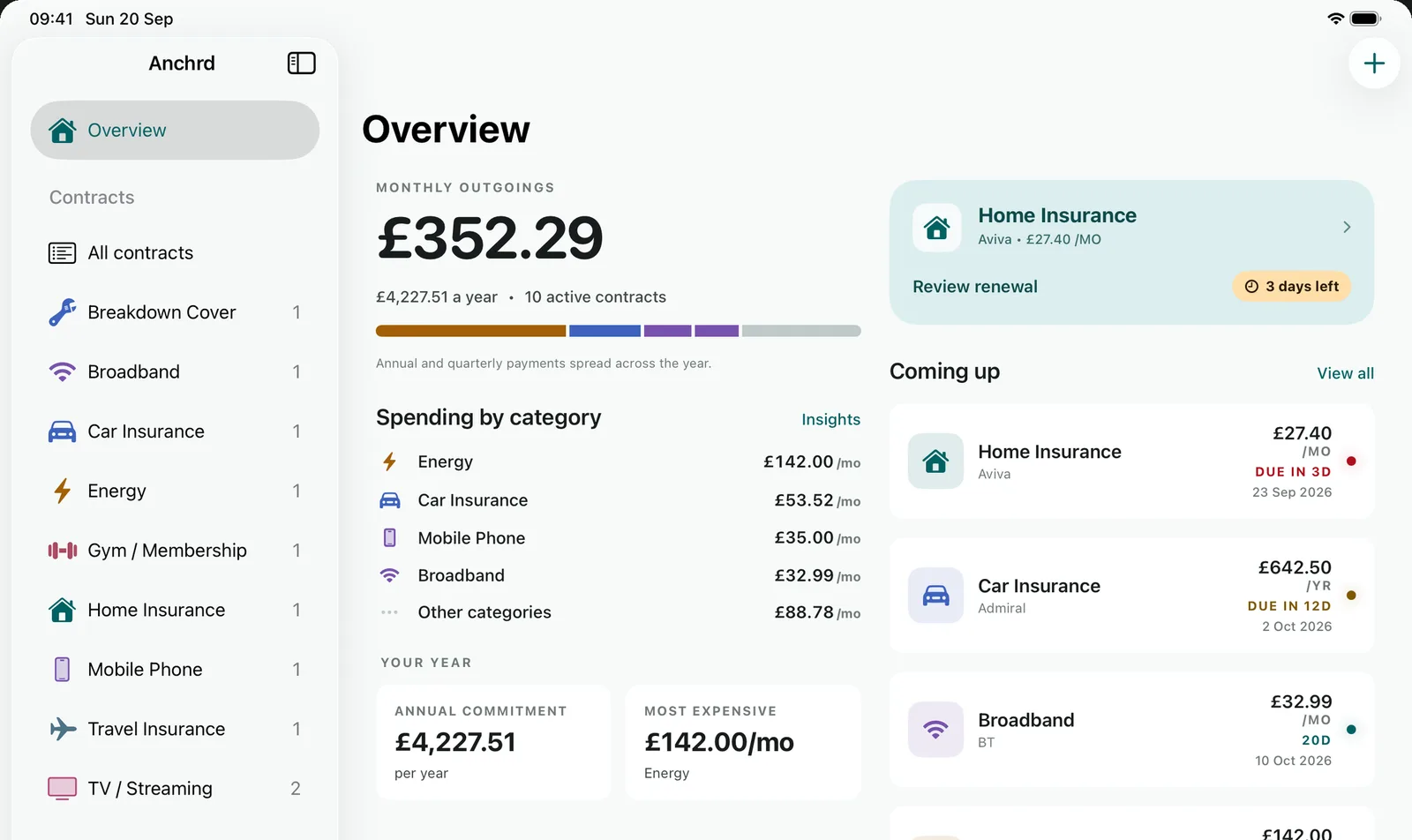
Ten agreements on one device: the renewal that needs a decision this week, the contract behind it, and what the year adds up to.
Overview opens on what the month costs and what the year adds up to, then the one renewal that needs a decision, with the days left on it. Everything else waits quietly underneath.
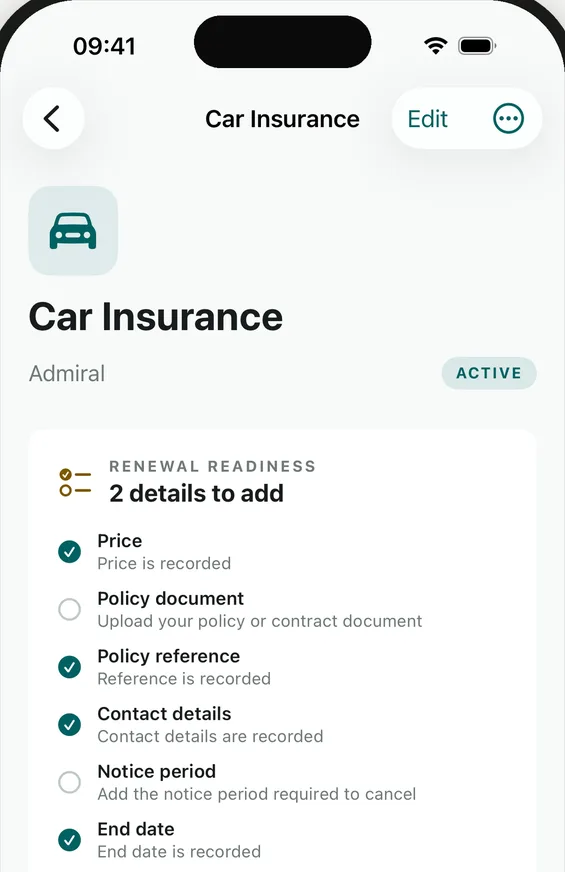
Each agreement keeps its price, policy reference, contact details, documents and notice period together. Renewal Readiness tells you what is still missing before the day arrives.
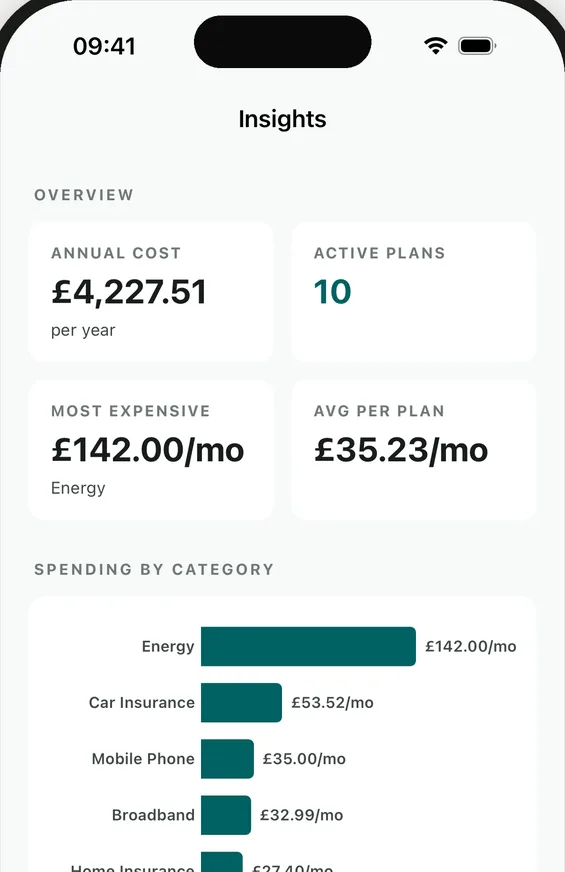
a month on energy alone142 pounds a month on energy alone
Insights turns the list into a yearly total, an average per plan and a spend by category, so the conversation about what to cut starts with numbers.
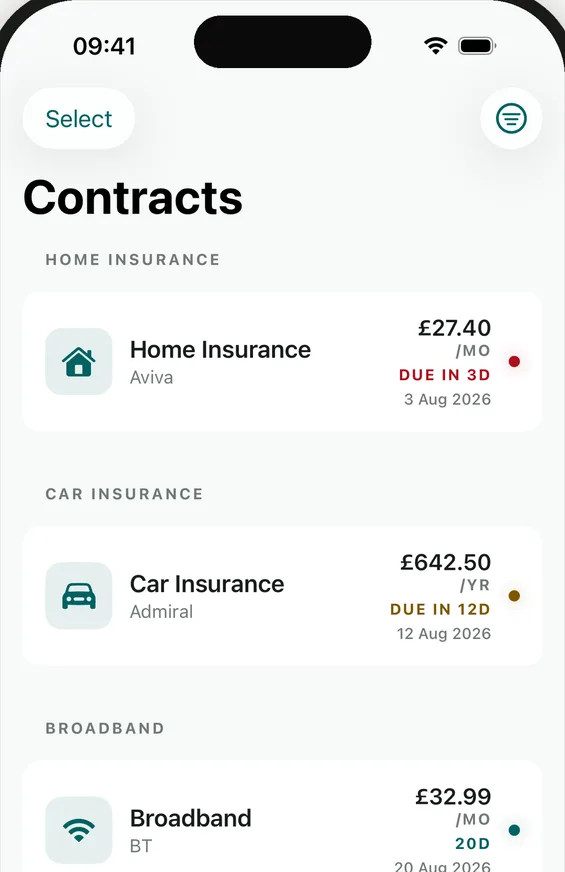
Contracts are grouped by category, each with its cost, billing period and a colour-coded due date. Search, filter and freeze the ones you have paused.
Scan a document, pick a file or a photo, or type it in. On an Apple Intelligence iPhone or iPad with Pro, Smart Scan fills the form for you, entirely on the device.
Tell Anchrd the end date and the notice period. You choose how far ahead you want warning; nothing is guessed.
A reminder arrives before the decision, not after the payment, with the policy number, documents and last price already to hand.
The same vault, laid out for the bigger screen. The sidebar keeps every category to hand while the Overview shows what is due, what it costs and what is coming up together.
Most apps tell you a payment went out. Anchrd works backwards from the deadline, so you hear about it while there is still a choice.
Your own reminder lands as the notice window opens. Compare quotes, or decide to stick, without pressure.
Your Home Insurance with Aviva renews in 14 days. Tap to review your options.
Delivered on your device. Prices and policy numbers never appear on the lock screen.
Cancel, switch or renew, with everything about the contract in one place. Then Anchrd rolls the date forward and starts watching again.
Anchrd has no accounts, no analytics and no servers of ours to send anything to. Your contracts and documents live on your iPhone or iPad and, if you turn it on, in your own private iCloud, which we cannot read. The only thing we ever hold is the email address you give us on this page, and only for the emails it promises. Read the privacy policy
No trial that quietly converts. Free stays free, and Pro is a plain subscription or a single payment. Prices are for the UK App Store.
£0
£1.99a month
or £14.99 a year
Launch offer. Founder Lifetime is £34.99 once, for all of Pro, forever.
Anchrd is built by Griffentek, a small independent studio in the UK. There is no funding round to satisfy and no growth team to feed, which is why there are no accounts, no analytics and no servers of ours: the app does not need your data to work, so it never takes it. Questions and ideas go to hello@anchrdapp.com, and a person replies.
Yes. Anchrd is a native iPhone and iPad app for iOS and iPadOS 26 or later. One purchase covers both. There is no Android or web version, and no plan to build one.
Smart Scan reads documents with Apple's on-device models, which arrived with iOS 26. Rather than ship a weaker app to older devices, Anchrd needs 26 for everything.
Turn on iCloud sync and your contracts follow you to the new device through your own private iCloud. Or export a password-protected backup and import it on the new device. Anchrd cannot recover a lost backup password.
No. Anchrd never sees a bank account, card or transaction. You enter what you pay, or scan the document that says so.
Yes, with Anchrd Pro. Household profiles keep each person's agreements separate, with a combined view of what the whole household pays. Profiles live on your device; they are not shared accounts.
Free covers up to 10 contracts with reminders, iCloud sync and encrypted backups. Pro adds unlimited contracts, household profiles, renewal advice and Smart Scan.
Smart Scan needs an iPhone or iPad that supports Apple Intelligence and an Anchrd Pro plan. On other devices the scan still saves the document and you fill in the details by hand.
How to get more from Anchrd, and what's new. Nothing else, and every email has a one-click unsubscribe.
Held by Brevo, our email provider, only for these emails. Privacy policy.
We read everything. Get in touch and a human will reply.